Showing posts with label app. Show all posts

Monday, December 17, 2012

Keeping Track of Your Loyalty Cards

Are you one of those women who have more of those annoying (and ugly) plastic loyalty store cards on your key ring than actual keys?  Yeah me too: Grocery stores, pet store, Bebe, gym card, library card, Godiva card (HELLO free truffle each month!).  At least I was that woman until I looked at my smartphone and said "what have you done for me lately?"

Well it turns out there are several apps out there to help you keep track of everything.


Keyring is great because of all the smartphones its available on. It has a great catalog of stores available for you.   Its easy to use and quick to upload your cards and share with your family.  You can also take a picture of your card (front and back).  It will show you any coupons or circulars available.  What I liked about this is being able to sign up for new loyalty cards from the app.
Cost: Free
Available: iPhone, Droid, Windows Mobile, Blackberry


Cardstar
Cardstar is probably the more popular one out there.  They have a ton of merchants in their catalog ready for use.  What I like about this one is being able to back up and sync to any mobile device so you can share cards with everyone in your family and save big (or at least spend more in my case).
Cost : Free
Available: Droid, iPhone, Blackberry


Passbook
Passbook is another popular one out there and I really liked the looks of it.  Sadly its only available on iPhone.  One thing I really liked about this, is it can show you when your coupons expire, where your concert seats are, and your all important boarding pass without having to launch a separate app.
Cost: Free
Available: iPhone

There are some other ones out there like Lemon, but I found these three the best with the design of the app and ease of use.  When it comes down to it, no matter which one you use, you will be glad to have gotten rid of your key ring clutter.  And having a key ring with only keys on it has made this gadget girl very happy.


Tuesday, February 28, 2012

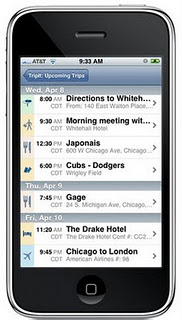
App Review: TripIT


TripIt - http://www.tripit.com/
Devices: iPhone, Android, Blackberry

Cost: Free (Paid Upgrade Available)

Travel day can be hectic enough, with the packing, getting out the door, remember if you turned off the coffee pot and oh yeah keeping track of all those airline, hotel, car, train confirmation numbers and departure times.


TripIt has made it so much easier to keep track of all your travel information.


- KEEP TRACK OF DEPARTURE TIMES Keeps all airline/train times and flight/train numbers in an easy to read format; Including layovers


- DIRECTIONS FROM AIRPORT/TRAIN TO HOTEL Automatically creates a list of directions that can be sent to email or printed out if you want


- SHARE WITH FRIENDS Share your trip plans with your TripIT Network of friends; Post your travel status to Linked-IN, FaceBook, or Twitter


- UPGRADE TO PAID VERSION To get email/text message regarding flight status and gate information; Keep track of all your airline/hotel/car points earned

Wednesday, January 18, 2012

App Review: On-the-go FitnessApp


Stay motivated by tracking your fitness and nutrition habits by using the free App called "myfitnesspal". If your phone doesn't support this App, you can still use it by going to their website www.myfitnesspal.com!

My cousin introduced me to this App and I love it.

You can track your workouts, the foods and drinks you consume for breakfast, lunch, and dinner and it will log your total calories consumed and total calories burned for the day.

It also shows you how many calories you can still eat that day and lose weight or maintain your weight. Not only that, it will also breakdown the vitamins and minerals you've consumed for the day. For example, if you've eaten 65% of your daily required vitamin C, the App will show your Total %, Goal %, and Left% for that day.

This App will create a profile for you and you input your basic information, such as current weight, height, age, and what your goal weight is. It's a huge motivator for me, especially when I'm on the road. It's so easy to swing by Starbucks and grab a coffee with banana nut bread, but when I have to add it to myfitnesspal, I think twice! Your friends can also create profiles and you can "add as friend" just like Facebook (yes, everything is like FB!) and send encouragement messages to help stay on the health track. Hope you enjoy.

Cheers to your good health!

- Suzan

Friday, January 13, 2012

App Review: Stylish Girl

Remember that scene from Clueless where Cher was flipping through her closet, taking pictures of her outfits, trying to decide what to wear?  Well now you can do it from your iPhone or Android phone using the ultimate style planner.

Basically all you do is take pictures of your entire wardrobe and put them into seasonal categories as well as types of clothing, dresses, pants, shoes, etc.  This can take a while, but is so worth it!

This app allows for more than just clothes, there is also a Beauty feature that can do almost the same with your makeup and fragrances.

- CARRY YOUR ENTIRE CLOSET WITH YOU and never buy duplicate items again


- CREATE AMAZING OUTFITS anytime and anywhere; Share them with your friends; Track your outfits by date worn

- SHOP ONLINE.  Mix and match online items against your clothes and outfits; Compare prices; Add items to your "Wish Bag" for future purchases


- DISCOVER the latest fashion looks and trends from online magazines and blogs


- PACK FOR YOUR TRIP QUICKLY without forgetting anything; Pick from your outfits or include individual pieces; This is great for traveling light without looking boring


Stylish Girl - http://stylishandcool.com/stylishgirl.html
Devices: iPhone, iPad, Android
Cost: FREE


- Cindy